December 2025 Release 23.10.26 (December 5, 2025)
The 23.10.26 release is expected for the following date:
On-premise - December 5, 2025
Cloud- December 6, 2025
Enhancements
Area | Release Note | |
|---|---|---|
EFIN-133423 | Workers Comp Distribution Report Needs Employee Counts | The report was changed to add the total employees to the report. |
EFIN-139632 | Employee Timesheet - FAS | We have added FAS to Employee Timesheets |
EFIN-130403 | A new BLS report "CES Report" is now available | A new BLS (Bureau of Labor Statistics) specific CES (Current Employment Statistics) Survey Report specific to School Districts is now available under the menu path, HRM → Reports → Payroll → BLS CES Report. User access / permission is considered for generating this report. Here’s the link for the online documentation - BLS CES Report |
Issues
Reference | Area | Release Note |
|---|---|---|
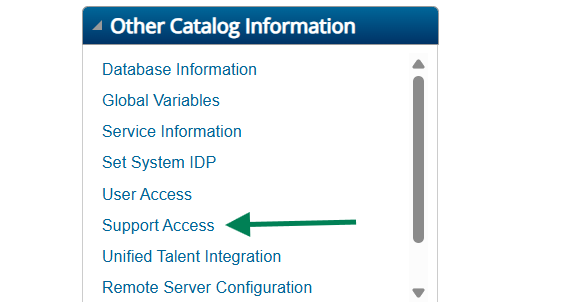
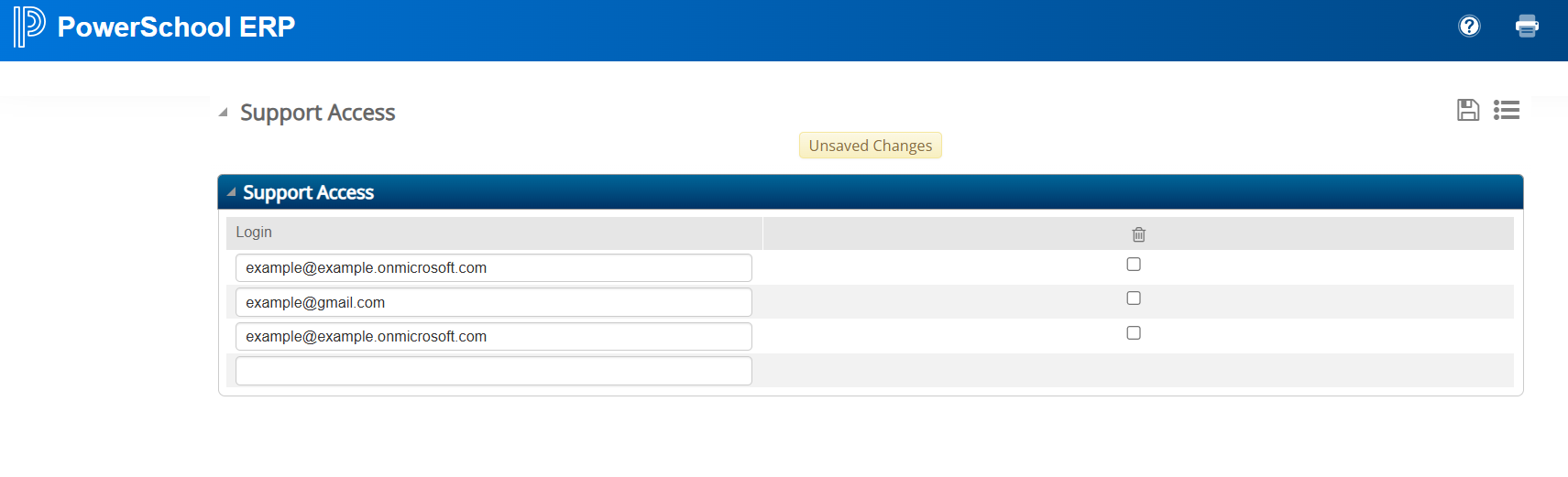
EFIN-126957 | Regular SSO was not able to access SUPPORT TOOL user menu, even if the user is a member of the Admin group in the Active Directory. | We created a new screen called Support Access. This screen is similar to the User Access screen. If a Regular SSO user has their SSO identifier entered in this screen, they will gain access to the Support Tools. To access the Support Access screen, the application must be set for Non-Hosted Environment. In the Hosted environment, the Support Access screen will not be available. On-premise application administrators across districts will have the ability to add entries to this table and provide access to Support Tools user menu. How will Admin navigate to the Support Access screen?
 |
EFIN-135498 | PO generated via Vendor Bidding System now print NET 45 Days as the terms. | In Vendor Bidding, Entry & Processing, Convert Bid to PO, when a bid was chosen & converted to PO, an issue was observed where the purchase order printed had NET 30 Days as the terms instead of NET 45 Days even when there was a custom to override default terms on POs to NET 45 Days from the standard NET 30 Days. This issue has now been resolved. |
EFIN-140065 | Employee Access Center Error After Resetting Enrollment Status | Resolved an issue where employees encountered a system error in Employee Access Center (EAC) after resetting their annual enrollment status. |
EFIN-140134 | 500 Internal Server When Accessing Employee Access Center | Fixed an issue where employees received a 500 Internal Server Error when trying to access new Employee Access Center (EAC). |
EFIN-133928 | Vendor Address and Alternate Address Populate While Making Corrections | The vendor address and alternate vendor address fields were being cleared while making corrections after a batch was run. This behavior has been changed so that the addresses remain. |
EFIN-133450 | Session Handling Improved to Prevent Unexpected Logouts | Resolved an issue where users were unexpectedly redirected to the 403 “Access Restricted” page while working in the system. When this occurred, all open screens would close, disrupting user activity. The session refresh process has now been enhanced to prevent unintended logouts, ensuring a more stable and consistent user experience. |
EFIN-137732 | Fatal Error on Update Bank Account | An issue with Update Bank Account causing a fatal error has been resolved. |
EFIN-135491 | Fixed fatal error after invalid data in Purchase Orders by Vendor report | Previously, in Purchasing, Reports, Purchase Orders by Vendor, when a user entered invalid data and clicked "Accept" to generate the Purchase Orders by Vendor report, the system displayed "No records to process" as expected. However, when the user entered valid data after that and attempted to generate the report again with valid input, a fatal error occurred, preventing the report from being generated. After the fix, the issue has been resolved so that after an invalid attempt, users can enter valid data and generate the report without encountering a fatal error. |
EFIN-130501 | Change Orders Not Limited by Purchasing Defaults | Changes to a user’s permissions could cause change order limits for purchasing, found in the Fund Accounting Profile, not to behave properly. This issue is now fixed and matches the behavior of the Purchase Order Listing screen. |
EFIN-139132 | Bulk Records Sync from SmartFind Express Failing | Fixed an issue where bulk attendance records from SmartFind Express (SFE) failed to sync with eFinancePlus (eFP) due to timeouts caused by the volume of records. |
EFIN-129782 | New Employee Access Center Not Sending Employee Change Notifications | Resolved an issue where the New Employee Access Center (EAC) was not sending employee change email notifications. |
EFIN-139171 | Import Tool: Certification Import Handling Enhanced for Future Dates | Previously, certification import jobs failed if the certification date extended far into the future. This issue has now been resolved, ensuring that certification imports complete successfully regardless of how far ahead the date is set. |
EFIN-140185 | Secondary positions report criteria persistence | The two Secondary Positions Report has been modified to use multi-dialog functionality to correct issues running different report types. |
EFIN-139738 | Cannot Void Payroll Check Using Pay Code with Non Cash Pay Time Type | Users can now Void Payroll Check Using Pay Code with Non Cash Pay Time Type |
EFIN-139676 | MO Employee Assignment | In the state of MO add the CTE Program Type field to the duplicate assignment check. This makes it so that if the CTE Program Type is different between 2 assignments that it will not give a duplicate error any longer even if all of the other fields used in the baseline duplicate check are the same. |
EFIN-139053 | Update to Precalc Exception Report | The precalc process has been updated to add these exception messages “CANNOT PAY WITHOUT AT LEAST ONE ORGANIZATION when missing distributions for a rate. This will match with payroll journal exception in payroll processing.” |
EFIN-130509 | Timesheet Clock-in Issue | The system will prevent employees from clocking in under multiple job classes for the same time period, so that payroll hours are accurately calculated, and employees are not overpaid due to duplicate entries. If a user attempts to clock in under multiple job classes for the same period, they will receive the following message: You are currently clocked in to Employee TimeSheets. Please clock out before initiating a new clock-in. |
EFIN-125729 | Staff Rules Permission Issues | The System Administration > SIS Integration >Staff Rules menu option now functions properly for any user who have access to run the option. |
EFIN-105193 | Invalid error message while validating account number in import attendance | Now gives the information that is incorrect for the account. |
EFIN-131723 | Location Activity totals issue in Location Activity Accounts Fiscal Summary Report | In Student Activities, Reports, Location Activity Accounts Fiscal Summary Report, a calculation mismatch occurred in the Prior to Date totals. This issue has now been fixed, and the report correctly calculates the Prior to Date totals. |
EFIN-139547 | Import load file option | If you click the import file button twice and on the second time don’t select a file then it caused a fatal error. Fixed the fatal error. |